

Getting around South Korea becomes easier when you know which transportation option to use, how to pay, and which apps can help you find your way.
You may take the subway to explore Seoul, a train to visit another city, a local bus to reach a neighborhood, or a taxi when you have luggage.
This guide brings those options together, with practical instructions, app download links, booking websites, and more detailed guides to help you prepare.
1. Which Transportation Should You Use?
Choose your transportation based on the complete journey, including walking, transfers, and the distance from your arrival station to your destination.
| Your Travel Plans | Transportation to Consider |
|---|---|
| Exploring Seoul or another city with an urban rail system | Subway and walking |
| Reaching a neighborhood farther from a subway station | Local bus or taxi |
| Traveling between cities connected by rail | KTX or another intercity train |
| Visiting a destination without a convenient train connection | Express or intercity bus |
| Traveling with luggage or wanting fewer transfers | Taxi |
| Exploring nearby shops, cafés, and attractions | Walking |
| Returning late at night | Check remaining transit services and compare taxi options |
A route with fewer transfers may be more comfortable even if it takes slightly longer.
If you are still planning the basics of your trip, start with our First-Time Korea Guide.
2. Download the Apps You Need Before Your Trip
Start with a navigation app, a translation app, and at least one taxi app. Install them before departure so you have time to check language settings, account access, and payment options.
Naver Map: Finding Your Route
Naver Map provides walking directions, public transportation routes, subway information, and place searches. It supports English, although some business names and local information may still appear in Korean.
Download Naver Map:
After installing the app, select English in the settings and save your hotel.
To plan a journey:
- Search for your destination.
- Confirm that the location pin shows the correct place.
- Select directions and enter your starting point.
- Compare public transportation and walking routes.
- Check the transfers, station exit, and final walking distance.
If an English search does not find the right place, try the Korean name or address from your booking confirmation or the business’s website.
Papago: Translation Help Along the Way
Papago offers text, voice, conversation, and image translation. It can help with transportation notices or a short question for a station employee.
Download Papago:
Keep your destination’s original Korean address available. Showing the address can be easier than trying to translate or pronounce the name.
For more information about navigation, translation, taxi, and other useful apps, read Essential Apps You Need for a Trip to Korea.
3. Tmoney: Paying for Local Transportation
Tmoney is a rechargeable transportation card used on compatible subways, city buses, and participating taxis. Eligible transfers may receive discounts under the applicable local fare rules.
Where to Buy a Card
Physical Tmoney cards are available at convenience stores such as CU, GS25, and 7-Eleven, along with designated transportation locations.
Buying the card and adding transportation money are separate steps. Make sure you load a balance before your first ride.
Recharging Your Card
Use a participating convenience store or compatible recharge machine. Keep some Korean won available because overseas credit cards are not accepted for every physical-card recharge method.
A practical approach is to load a modest amount, check your balance as you travel, and recharge when necessary.
How to Tap Your Card
- Subway: Tap when entering and again when exiting.
- City bus: Tap when boarding and again when getting off.
- Participating taxi: Confirm acceptance and tell the driver you want to use your transportation card.
For subway travel, each traveler should have their own card.
A physical card can be a straightforward choice for visitors. Mobile options require a compatible device and an eligible setup, so check current requirements before relying on your phone alone.
Our detailed guide covers buying, recharging, using, and choosing a card: How to Use T-Money in Korea.
Important: Tmoney does not replace the reserved ticket you need for a journey such as KTX.
4. Subways: Exploring Major Cities
The subway is a useful starting point for sightseeing in Seoul. Urban rail systems also serve cities including Busan, Daegu, Daejeon, and Gwangju.
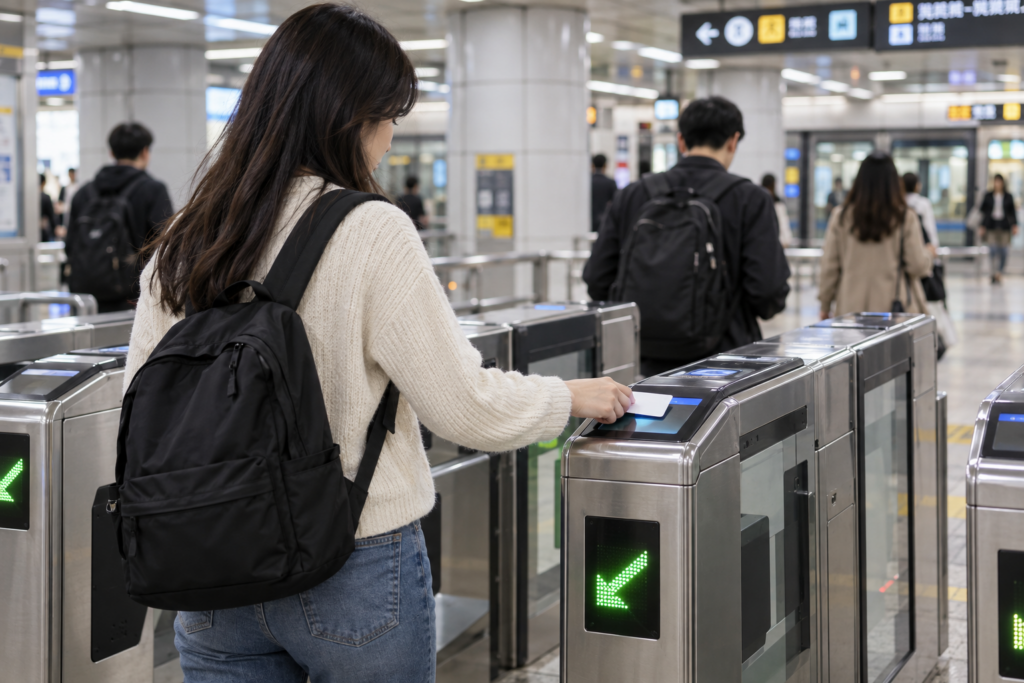
How to Take the Subway
- Check your route in Naver Map.
- Identify the line, direction, and transfer stations.
- Enter through the fare gate using a compatible card or ticket.
- Follow the signs to the platform.
- Confirm the direction before boarding.
- Transfer where required.
- Tap again at the exit gate.
Check the Direction and Exit
The line number alone does not tell you which platform to use. Compare the next stations on the platform signs with your route.
When you arrive, check the recommended exit number before leaving the station. A different exit may add walking or put you across a busy road.
If you have luggage or need step-free access, look for an elevator route.
Plan Your Return Journey
Check the last available service for your specific route and direction. If you need a transfer, confirm that the connecting service will still be running.
For help preparing your fare card, see How to Use T-Money in Korea.
5. Local Buses: Reaching Places Beyond the Subway
Local buses can bring you closer to a destination or provide a more direct route.
Before boarding, check the bus number, direction, boarding stop, and stop where you need to get off.
How to Take a City Bus
For a typical Seoul city bus:
- Wait at the correct stop.
- Board through the front door.
- Tap your transportation card.
- Follow your progress in the navigation app.
- Press the stop button before your stop.
- Exit through the rear door.
- Tap your card again.
The exit tap matters for fare calculation and eligible transfers. Some buses are cashless, so prepare a compatible transportation card.
Check which side of the street you need. Stops across from each other may serve buses traveling in opposite directions.
If the route involves several transfers or you have heavy luggage, compare it with a taxi journey before deciding.
Our Essential Apps Guide explains the navigation tools that can help you follow your route.
6. Trains: Traveling Between Cities

For regional travel, compare trains with long-distance buses.
KTX is Korea’s high-speed rail service. Other services, including ITX-Saemaeul and Mugunghwa, provide additional routes and stops. The available options depend on your journey.
Where to Book Train Tickets
Start with the official KORAIL website to check KORAIL services and reserve tickets.
Tickets are also available at station ticket offices and kiosks.
Before You Book
Confirm:
- Your exact departure station
- Your arrival station
- Travel date and departure time
- Train service and fare
- Seat selection, where available
- The onward journey from the arrival station
A fast train is only one part of the trip. Check whether you will need a bus or taxi afterward.
On Travel Day
Save your ticket somewhere easy to access. Allow time to locate the platform and check the train number, carriage, and seat.
If a particular departure is essential to your itinerary, book early, especially around weekends and major holidays.
7. Express and Intercity Buses: Another Regional Travel Option
Long-distance buses are useful when a train does not provide a convenient connection.
Korea has express buses and intercity buses. The correct terminal depends on your destination, so check the full departure terminal name before leaving your hotel.
Websites for Routes and Tickets
Tickets can also be purchased at terminal ticket offices or kiosks. Booking and payment options vary by platform.
Before traveling, confirm the departure time, boarding gate, arrival terminal, and any ticket collection instructions.
Treat a long-distance bus trip as a separate ticketed journey. Do not assume that it works like boarding a local city bus.
8. Taxis: Kakao T, Uber, and Other Options

Taxis are useful when you have luggage, want less walking, or need a direct ride to your destination.
In Korea, Kakao T is one of the main taxi apps to know. Uber is another option, especially for visitors who already use it, while k.ride offers features designed for international travelers.
Kakao T: A Widely Used Taxi App in Korea
Kakao T lets you request taxis and choose from available vehicle types, including Blue, Venti, Deluxe, and Black. Availability depends on your location and the service you select. The app also supports English.
During my visits to Korea, I used Kakao T to request taxis. It was the taxi app I relied on for getting around.
For travelers, entering the destination before requesting a ride can reduce the need to explain the address to the driver.
Download Kakao T:
How to Request a Taxi With Kakao T
- Open the app and select the taxi service.
- Confirm your pickup location.
- Enter your destination and check the location pin.
- Review the available taxi types and fare information.
- Confirm the payment method.
- Request the taxi.
- Check the driver and vehicle details before getting in.
Pay particular attention to your pickup pin. A location across the street or at the wrong building entrance can make it difficult for the driver to find you.
Account Setup and Payment
Install Kakao T and complete the account setup before you need your first ride.
International visitors may encounter different registration or payment requirements depending on their account and payment method. Check the options available in your app rather than assuming every card or taxi service will work the same way.
If in-app payment is unavailable, look for a “Pay to the driver” option where offered. Confirm the payment arrangement before requesting the ride.
k.ride: Another Option From Kakao Mobility
If setting up Kakao T is difficult, consider k.ride, also operated by Kakao Mobility.
It supports multilingual destination searches and driver communication, allows Google or Apple login, and offers overseas credit card registration. These features can make it a useful option for visitors without an established Kakao account.
Download k.ride:
Review the selected vehicle, fare details, and payment method before confirming your request.
Uber: A Familiar Option for American Visitors
You can also check Uber in Korea. Uber provides taxi requests, including in Seoul, and may connect you with a licensed Korean taxi rather than the private rideshare vehicle you expect in the United States.
If you already have an Uber account, open your existing app and check the available services at your location.
Confirm your pickup point, destination, fare information, and payment method before requesting a ride. Driver availability can vary, so having another taxi app ready gives you an additional option.
Download or update Uber:
For more details about using your account, payment methods, and airport pickups, read Can You Use Uber in Korea?.
Which Taxi App Should You Prepare?
| App | When to Consider It |
|---|---|
| Kakao T | You want to use a widely used Korean taxi platform, particularly if you already have a Kakao account |
| k.ride | You want multilingual features and a setup designed for international travelers |
| Uber | You already use Uber and want to check a familiar app first |
You do not need all three. Set up one that works for you and consider keeping a second as a backup.
For a closer look at taxi, navigation, and translation apps, read Essential Apps You Need for a Trip to Korea.
Taking a Taxi Without an App
You can also use a taxi stand. These are commonly found at major stations, terminals, and shopping areas.
Keep your destination’s Korean name and address ready to show the driver.
Many taxis accept cards, but having a backup card and some Korean won is useful. If you want to pay with Tmoney, confirm that the taxi accepts it and that your card has enough balance.
Learn more about transportation card payments in How to Use T-Money in Korea.
9. Keep Your Phone and Travel Details Ready
A mobile data connection helps you request taxis, receive messages, and check directions while outside.
Before departure, review your international phone plan or arrange a suitable SIM or eSIM. Confirm that you can receive any verification messages needed for your apps.
Save:
- Your hotel’s Korean name and address
- Planned destinations
- Train and bus tickets
- Important reservation details
Screenshots provide a backup for addresses and tickets, but live navigation and taxi requests still need a working connection.
10. Your Transportation Checklist
Before your first day of exploring:
- Download Naver Map and select English.
- Install Papago.
- Set up Kakao T, k.ride, or Uber before your trip.
- Save your hotel and planned destinations.
- Prepare a physical or compatible mobile transportation card.
- Keep a modest amount of Korean won.
- Arrange any required train or long-distance bus tickets.
- Check the return journey before an evening outing.
You can combine transportation options throughout the day. Take the subway to a neighborhood, explore on foot, and use a taxi back when you are tired.
Final Thoughts
You do not need to learn every transportation system before visiting Korea.
Start with the journeys you plan to take. Use a navigation app to compare routes, prepare a payment method for local transit, and arrange separate tickets for regional travel.
These guides can help you with the next step:
- How to Use T-Money in Korea
- Can You Use Uber in Korea?
- Essential Apps You Need for a Trip to Korea
- First-Time Korea Guide
With your routes, cards, and apps ready, you can spend more time enjoying your trip and less time figuring out the next ride.